Blog

Notes and tutorials on R, data science, and prospect development.
Written for my future self and hopefully useful to you too.

Portfolio Visualizations, Pt. 1

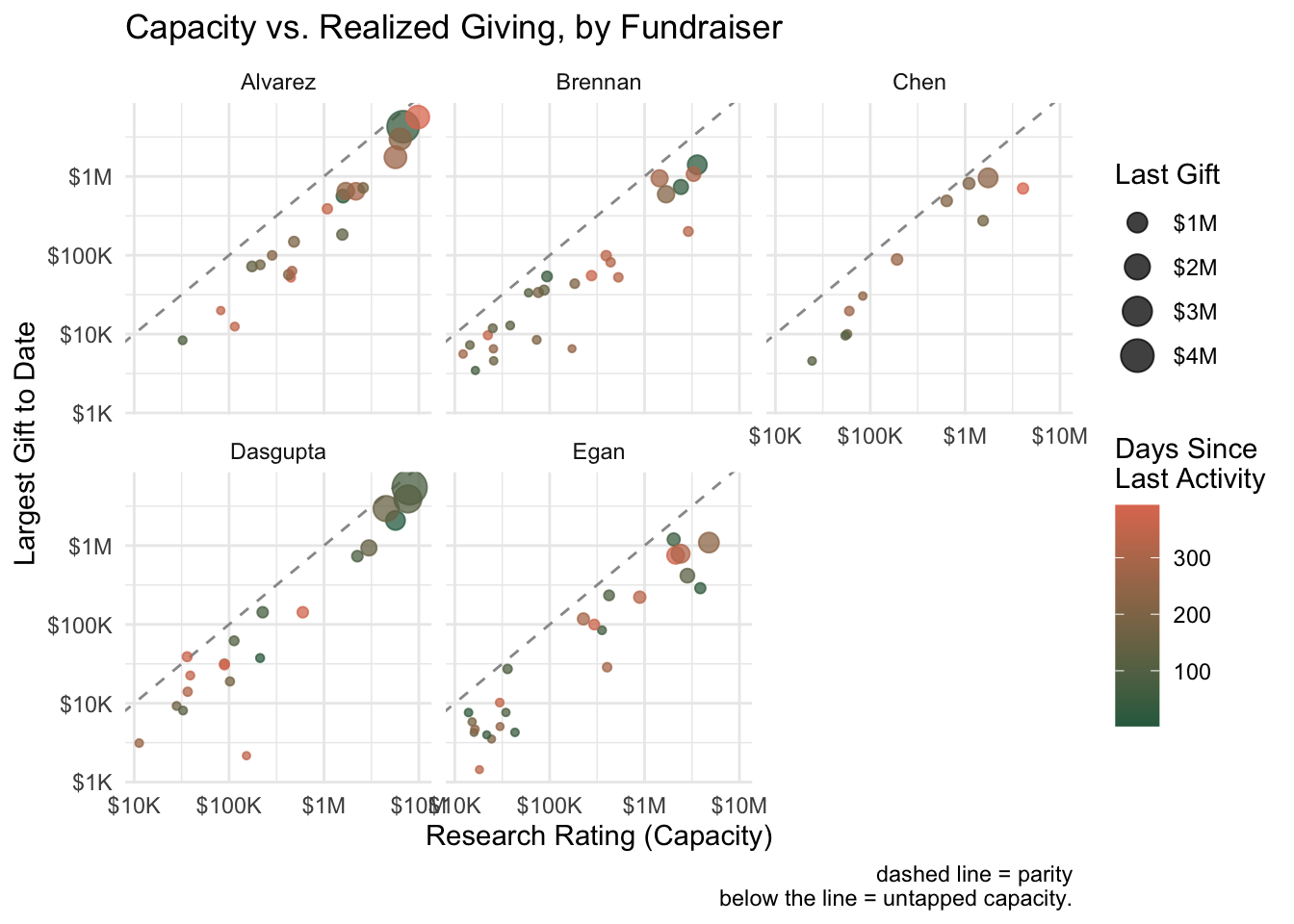
I was recently playing around with some different ways of visualizing fundraiser portfolios. In development work, we often talk about portfolio management in abstract terms—capacity, engagement, pipeline health—but these concepts become much more tangible when you can see them.

The visualizations below attempt to answer a few key questions that come up regularly in portfolio reviews:

  • Are we realizing the capacity in our portfolios, or is there untapped potential?
  • Which prospects are going cold, and which fundraisers have the healthiest engagement patterns?
  • Where should we focus our attention?

All of these use simulated data, but the patterns they reveal would apply to any major gift portfolio.

Stopping Scripts in R

I use a series of scripts to generate regular reports, and I often want the process to pause at key points—either to check progress or to flag issues that need my attention. One common example involves a lookup table that maps each fundraiser to their team. I append that team information to my reports so I can easily segment the data by team and individual fundraiser.

But what happens when something changes? A new team member joins and isn’t in the lookup table yet. Someone gets married and their last name changes. Suddenly, that person is no longer associated with the correct team, and the report quietly becomes wrong. Here’s how I catch those issues before they slip through.


→ The Most Important Machine Learning Equations

Whether you’re building models, optimizing algorithms, or simply trying to understand how ML works under the hood, mastering the core equations is essential. This blog post is designed to be your go-to resource, covering the most critical and “mind-breaking” ML equations—enough to grasp most of the core math behind ML.

I love seeing people dig into the math behind machine learning algorithms. For each one, the blog shows the:


→ P-Hacking in Startups

You looked at the results, picked the one that cleared the bar, and ignored the fact that the bar was never calibrated for this setup.

This is a nice, real world example of the use case for the Bonferroni correction.


Helper Function: Load Files

This function looks at the files inside of a specified folder and find the most recent file. I often do regular reporting and, depending on the project, I’ll organize my files in one of two ways:

  1. By date I ran the data (i.e 2025-06-12 Report Data/2025-06-12 File 1.csv)
  2. By file type (i.e. Address Data/2025-06-12 Address Data.csv)

In the case of the latter, I want to be able to get the most recent file without manually typing in the date into my code. Doing things that way ensures I will inevitably forget to adjust the date the next time and end up with the wrong results.

Here is the code:


Getting Time in Stage from Blackbaud’s SKY API

Background

There are many things I find frustrating about Blackbaud’s Raiser’s Edge NXT product, but one that has caused more headaches than anything else has been the inability to query when a prospect status was applied to a record. I can click on a prospect’s record and see when a status was last changed, but there is no way to get that data for a list of prospects from within lists, queries, reports, or even a SQL backup of the database.

The only place to access that information is via Blackbaud’s SKY API. The specific API - Prospect status (Get) - returns five data points:

  • comments - comments made when the status was changed
  • constituent_id - the system record ID of the prospect
  • days_elapsed - the number of days the prospect has been in the status
  • start - the start date of the prospect status
  • status - the current prospect status

Setup

Here are the libraries I’m using.


Disqualifying Prospects

I imagine that most of us are familiar with the traditional prospect statuses that make up the donor lifecycle.

Source: FreeWill

Source: FreeWill

Helper Function: Normalize Phone Numbers

This is the first in a series of helpful R functions that I’ve developed, massaged, and used over the years. I’m titling these “helpR” posts in the naming style of many R packages.

This first function allows for the normalization of phone numbers. I created this function as I was trying to match user-entered numbers from our patient guarantor data with those from our fundraising database.

•   XXX-XXXX for 7-digit numbers
•   XXX-XXX-XXXX for 10-digit numbers

Invalid numbers (not 7 or 10 digits) are replaced with a custom value (default NA).

Obviously this doesn’t work for numbers that have extensions or country codes, but as my use case is primarily for home and cell phone numbers, that hasn’t been a big issue so far.


Excel to R: VLOOKUP

One of the advantages to moving away from Microsoft Excel to something like R is the ability to script out exactly what you want the program to do. You might be thinking, “That sounds like a lot of work. I’m already fast in Excel and even have some macros I use to automate my work.” That’s fantastic, and in the short term you may well be quicker in Excel. But what happens if the steps to the macro change or the report is requested more frequently?

Here, we’ll look at recreating the functionality of a VLOOKUP formula in R. In this example, we’ll take a list of gift officers and append their fundraising team. You might imagine using this to create a report segmented by team.

First we need some data. This could come from a .csv or .xlsx file, but for this example I’ll create some sample data.


No matching items
Back to top